- #http
- #developer tools
- #api
- #testing
- #cli
.http Files Are the Best API Workflow You're Not Using
Plain-text .http files beat GUI API clients for versioning, code review, and CI. Here's the workflow that replaced Postman on my team.
The pull request looked innocent enough. A teammate had committed a Postman collection export: 14,000 lines of JSON, all machine-generated, with tokens and URLs scattered through nested objects. The PR description said “updated API docs.” Nobody could review it. Nobody tried. We merged it and moved on.
That was the moment I started thinking about what an API workflow actually needs. The requirements are short: requests should be readable, versionable, reviewable in a diff, and runnable in CI. Postman delivers on exactly one of those. Maybe one and a half.
The answer has been hiding in plain sight. The .http file format, a simple plain-text format for defining HTTP requests, has been supported in JetBrains IDEs for years and in VS Code through the REST Client extension. It’s not new. But the ecosystem around it has matured to the point where I think it’s the best way to manage API workflows for most teams.
The Format: Requests as Plain Text
A .http file is almost embarrassingly simple. Each request is defined in plain text, separated by ###:
### Get all users
GET https://api.example.com/users
Authorization: Bearer {{auth_token}}
Content-Type: application/json

### Create a new user
POST https://api.example.com/users
Authorization: Bearer {{auth_token}}
Content-Type: application/json

{
  "name": "Jane Smith",
  "email": "jane@example.com",
  "role": "admin"
}

### Update user by ID
PUT https://api.example.com/users/{{user_id}}
Authorization: Bearer {{auth_token}}
Content-Type: application/json

{
  "role": "editor"
}

### Delete user
DELETE https://api.example.com/users/{{user_id}}
Authorization: Bearer {{auth_token}}
That’s a complete CRUD collection. You can read it. You can review it in a PR. You can tell what changed in a git diff. Try doing that with a Postman export.
Variables use {{variable_name}} syntax. You define their values in environment files:
// http-client.env.json
{
  "development": {
    "host": "http://localhost:8080",
    "auth_token": "dev-token-12345"
  },
  "staging": {
    "host": "https://staging-api.example.com",
    "auth_token": "{{$dotenv STAGING_TOKEN}}"
  }
}
Notice how the staging token references an environment variable instead of being hardcoded. Secrets stay out of version control. Your CI system injects them at runtime.
Why Plain Text Wins
The advantages of .http files over GUI-based API clients compound over time:
Git diffs are meaningful. When someone changes a request, you see exactly what changed: a new header, a different request body, an updated URL. Compare that with a JSON export where moving one request changes 200 lines of serialization artifacts.
Code review works. Your team already reviews code. Now API requests live in the same review process. You can comment on a specific header choice. You can catch a hardcoded production URL before it causes trouble.
IDE support is free. JetBrains IDEs (IntelliJ, GoLand, WebStorm) run .http files natively. VS Code has the REST Client extension. No login, no account, no subscription. Click a request and it runs.
Onboarding gets easier. A new developer clones the repo, opens the api/ directory, and sees every request the team uses. No “can you add me to the Postman workspace” conversation. No “which collection has the auth endpoints” Slack message.
Documentation stays adjacent. When the .http files live next to the code that implements the API, they stay in sync naturally. A PR that changes an endpoint also updates the request file. When they live in a separate GUI tool behind a login, drift is inevitable.
CI Smoke Tests with Response Assertions
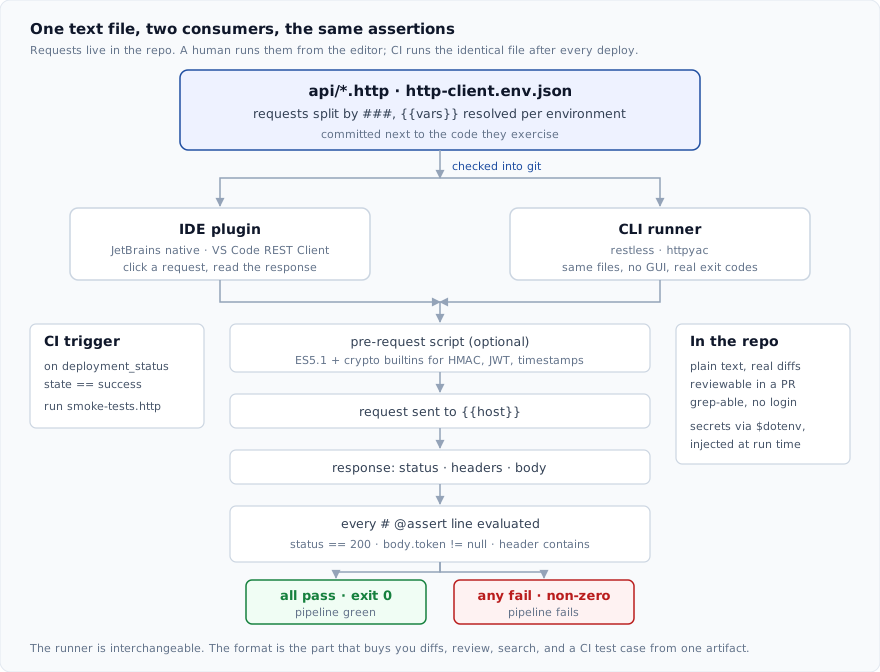
Here’s where .http files go beyond “better Postman.” You can add assertions to requests and run them as part of your CI pipeline:
### Health check (must return 200)
GET {{host}}/health
# @assert status == 200
# @assert body.status == "ok"

### Auth endpoint returns JWT
POST {{host}}/auth/login
Content-Type: application/json

{
  "username": "smoke-test-user",
  "password": "{{SMOKE_TEST_PASSWORD}}"
}

# @assert status == 200
# @assert header Content-Type contains application/json
# @assert body.token != null

### List users requires auth
GET {{host}}/users

# @assert status == 401
Now your CI pipeline can run these after each deploy:
# .github/workflows/smoke-tests.yml
name: API Smoke Tests

on:
  deployment_status:
    types: [success]

jobs:
  smoke:
    if: github.event.deployment_status.state == 'success'
    runs-on: ubuntu-latest
    steps:
      - uses: actions/checkout@v4

      - name: Set up Go
        uses: actions/setup-go@v5
        with:
          go-version: '1.22'

      - name: Install restless
        run: go install github.com/shahadulhaider/restless@latest

      - name: Run smoke tests
        env:
          SMOKE_TEST_PASSWORD: ${{ secrets.SMOKE_TEST_PASSWORD }}
        run: |
          restless run api/smoke-tests.http \
            --env staging \
            --assert \
            --exit-code
Every request with # @assert lines becomes a test case. If any assertion fails, the step exits non-zero and the pipeline fails. You’ve just turned your API documentation into a test suite, and it cost you a comment line per assertion.
We’ve caught at least four production regressions this way. Each one would have been discovered by customers if the smoke tests hadn’t flagged it within minutes of deploy.
That’s the whole shape of the workflow: one committed file, an editor and a CI job reading it, and the same assertions deciding the outcome either way.
The Tooling Landscape
The .http format doesn’t lock you into one tool. Several options exist for running requests from the command line and from editors:
IDE plugins are the quickest way to start. If you already use IntelliJ or VS Code, you’re one click away from running .http files. No configuration needed.
httpyac is a solid CLI runner that handles the core format well, including variable interpolation, assertions, and scripting hooks.
And yes, I built one too. restless is a terminal HTTP client I wrote because I wanted a tool that combined .http file execution with vim-style keybindings, import from Postman/Insomnia/Bruno/curl/OpenAPI, and code generation in 8 languages (Python, JavaScript, Go, Java, Ruby, HTTPie, curl, PowerShell). It’s a Bubble Tea TUI, so it fits into the terminal workflow I’ve been building across ports and envdiff.
I’m biased, obviously. But the .http format is the important part, not which runner you pick. Any of these tools reads the same files. That’s the entire point.
Migrating from Postman (or Insomnia, or Bruno)
If your team already has collections in a GUI tool, migration is more straightforward than you’d expect:
Step 1: Export your collections. Postman exports to JSON. Insomnia exports to YAML or HAR. Bruno stores requests as .bru files that are already pretty close to plain text.
Step 2: Convert. Several tools can import these formats and emit .http files. You can also convert manually for small collections. The format is simple enough that a few minutes of copy-paste usually does it for a dozen requests.
# Import a Postman collection
restless import postman-collection.json --output api/

# Import an OpenAPI spec
restless import openapi.yaml --output api/

# Import from a curl command
restless import --from-curl 'curl -X GET https://api.example.com/users -H "Authorization: Bearer token"'
Step 3: Organize. Group files by domain or service: api/users.http, api/auth.http, api/billing.http. Keep a smoke-tests.http with your CI assertions separate from exploratory requests.
Step 4: Adopt gradually. The easiest path is to keep the GUI tool available for a few weeks while the team gets comfortable. Most people pick up the format in a day because it’s just HTTP written out. Once the .http files are in the repo and CI is running assertions against them, the GUI tool becomes optional rather than essential.
Tips for the Transition
- Start with one service or one API domain, not the entire collection at once.
- Put
.httpfiles in the same directory as the API code they test. - Write assertions for the critical paths first: health checks, authentication, and the three most important business endpoints.
- Don’t fight the people who still want a GUI for exploratory work. It’s fine for quick, throwaway requests. The goal is to make the canonical API definition live in version control, not to ban all other tools.
- Add a
README.mdin theapi/folder explaining the format and how to run requests. The format is simple, but people appreciate a pointer.
Request Scripting and Dynamic Values
For more advanced workflows, .http files support dynamic values and scripting. Need to generate a timestamp, compute an HMAC signature, or chain requests together? Pre-request and post-request scripts handle that:
### Create order with timestamp
# @pre-request
# const timestamp = new Date().toISOString();
# request.variables.set("timestamp", timestamp);
# @end

POST {{host}}/orders
Content-Type: application/json

{
  "item": "Widget",
  "quantity": 5,
  "timestamp": "{{timestamp}}"
}

# @assert status == 201

### Get the order we just created
# @pre-request
# const orderId = response.body.id;
# request.variables.set("order_id", orderId);
# @end

GET {{host}}/orders/{{order_id}}

# @assert status == 200
# @assert body.item == "Widget"
This keeps the request definition readable while allowing computation where you need it. The scripting layer is ES5.1 JavaScript with crypto builtins, so you can handle HMAC auth, JWT generation, or any pre-processing without reaching for an external tool.
Takeaways
After running this workflow for about a year across a team of eight engineers, here’s what stuck:
-
The format is the feature. Plain text wins because of what it enables: diffs, review, search, CI integration. The specific runner matters much less than the decision to store requests as text.
-
Assertions in CI catch real bugs. Smoke tests that run after every deploy are cheap insurance. A
# @assert status == 200line takes five seconds to write and has saved us hours of debugging. -
Onboarding time dropped measurably. New engineers used to spend their first day getting Postman set up, joining the workspace, and hunting for the right collections. Now they clone the repo and start reading.
-
It’s not all-or-nothing. You can adopt
.httpfiles for your core API flows while keeping a GUI tool for exploration and ad-hoc requests. The two approaches coexist fine. -
Secrets management is cleaner. With environment files and variable interpolation, tokens never touch version control. Your CI system handles injection the same way it handles every other secret.
Your API workflow shouldn’t live in a binary blob owned by a SaaS login. Put it in a text file, commit it next to the code, and let your tools work for you.